Different Kinds of Resumes: Pick Your Perfect Format
Analysis of more than 125,000 resumes found that many get filtered out before a recruiter reviews them, often because they miss job-description keywords or use weak formatting. Your resume type affects that outcome.
Pick the format that matches your career situation. Do not guess. Use a chronological resume for a steady work history, a functional resume only when your timeline creates a problem, and a combination resume when you need both skills and proof. If you need help choosing between the first two, use this guide on chronological vs. functional resume formats.
This article does not stop at definitions. It tells you which resume type to use, what each format must include, what mistakes to cut, and how to keep the document ATS-friendly. Choose the format that fits your background, the job you want, and the way employers screen applications.
Table of Contents
1. Use a Chronological Resume for a Linear Career Path
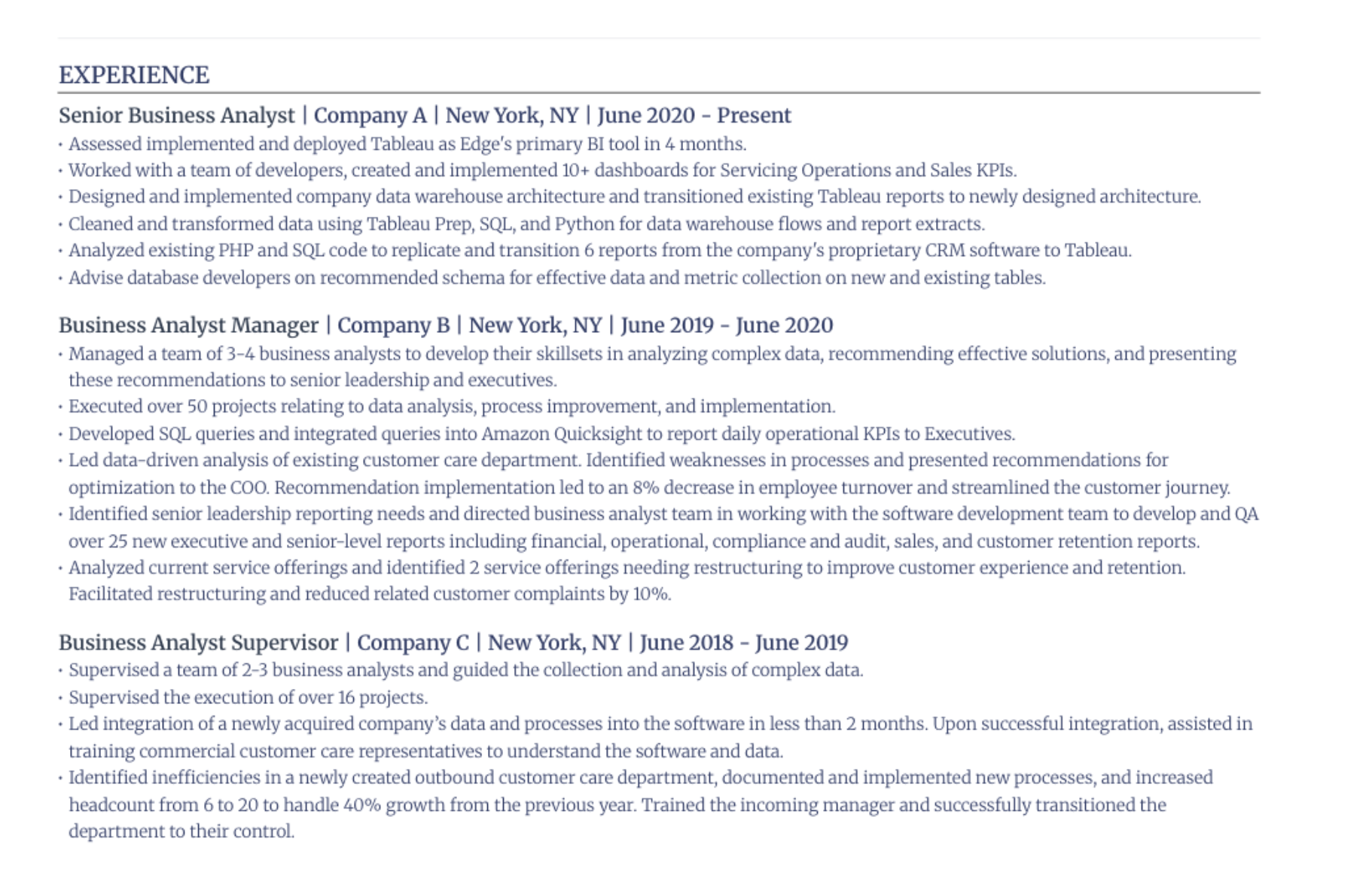
Use a chronological resume if your career path is stable and your next role is close to your last one. This format is the default because it makes progression easy to scan. It also matches how most recruiters expect to read work history.
A finance analyst moving to a senior finance analyst role should use this. A nurse moving from staff nurse to charge nurse should use this. A software engineer moving from junior to senior engineer should use this.
Put your work history first
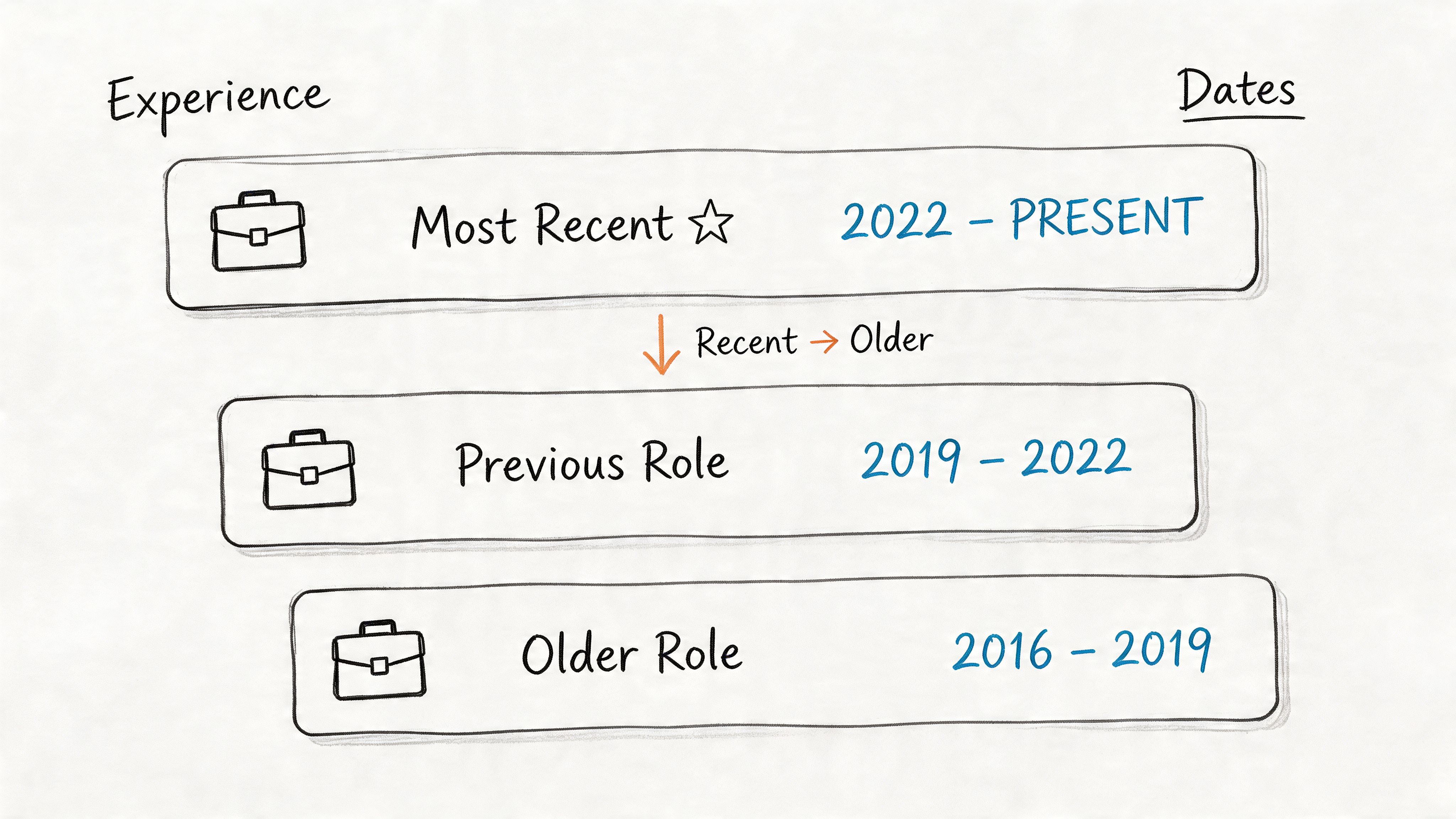
List jobs in reverse order. Start with your current or most recent role. Use clear dates. Use standard headings like Experience, Education, and Skills.
Read chronological vs functional resume guidance before you choose anything else if your background is straightforward.
Use bullets like these:
- Show progression: Group promotions under the same employer when possible.
- Use clean dates: Write dates in one format, such as
Jan 2022 - Mar 2024. - Lead with results: Put your strongest, most relevant bullet first under each job.
- Cut old detail: Trim early-career jobs to one or two bullets if they aren't relevant.
Before:
Staff AccountantHandled monthly close, reports, and reconciliations.After:
Staff Accountant | Westlake Health | Jan 2022 - Present- Closed monthly books for multi-entity operations and delivered reconciliations on schedule- Reduced reporting errors by standardizing account review procedures- Supported audit prep with organized documentation and issue trackingPut your best evidence near the top. Recruiters scan fast and often start with the most recent role.
2. Deploy a Functional Resume to Emphasize Skills Over History
Use a functional resume only if your timeline would distract from your fit. This format puts skills first and minimizes dates. It can help when you're changing fields, returning to work, or translating unrelated experience into relevant capability.
Typical cases include a military veteran moving into civilian operations, a parent returning after a gap, or a creative freelancer with project-based work. The problem is simple. A functional resume can also create suspicion because it hides chronology.
Use this only when the timeline hurts you
Coursera notes the ATS compatibility problem directly. Chronological resumes are commonly described as the format best equipped to scan, while functional and combination formats are often suggested for career changers, but there isn't solid quantified evidence on how those alternatives perform across systems (Coursera on resume types and ATS confusion).
Indeed-based background in the verified data raises the bigger warning. Some guidance says functional resumes can “open a can of worms, creating more problems than they solve,” especially when recruiters think you're hiding gaps or weak experience (Indeed discussion of functional resume stigma).
If you still use one, do this:
- Add a short work history: Include employer, title, and dates after the skills section.
- Match skill headings to the posting: Use headings like Project Management, Client Support, Data Analysis.
- Keep proof under each skill: Don't just list abilities. Add bullets tied to outcomes.
- Run an ATS check: Use ATS-friendly resume guidance before you submit.
Example:
Customer Support- Resolved escalated service issues across phone, chat, and email- Documented recurring problems and improved internal response consistencyOperations- Coordinated scheduling, vendor communication, and task tracking across teamsWork HistoryAdministrative Coordinator | Elm Street Clinic | 2021 - 2023Office Assistant | Bright Kids Center | 2018 - 2021Don't use this as your default. Use it as damage control.
3. Select a Hybrid Combination Resume for a Balanced Approach
Use a hybrid resume when a plain chronological format undersells you. It is the right choice for career changers, candidates moving up a level, and applicants with strong transferable skills who still have credible work history. It gives recruiters the skills first and the timeline right after. That balance matters.
Do not use this format to bury weak experience. Use it to control emphasis without creating ATS problems.
Put the right skills first, then prove them fast
Start with a job-specific headline and a short skills block. Follow that with reverse-chronological experience. Keep the structure simple so recruiters can scan it and ATS software can parse it.
Use this order:
- Headline:
Product Marketing Manager - Core strengths:
Go-to-market strategy, market research, cross-functional leadership, product launches - Experience: Reverse chronological roles with achievement bullets
- Education and tools: Degrees, certifications, software, platforms
Keep the top section focused. Add 8 to 12 skills that match the job description. Then repeat those same themes in your experience bullets with proof. If you need help matching your wording to the posting, use this guide on how to tailor your resume to a job description.
Example:
Core Qualifications- User research- Roadmap planning- Stakeholder communication- SQL- A/B testing- Product analyticsExperienceMarketing Manager | Northline Software | 2021 - Present- Led launch planning for new SaaS features with sales, design, and product teams- Used customer research to refine messaging and support adoptionSkip fancy layouts, columns, graphics, and rating bars. They break parsing and waste space. Use clear section headings, standard job titles when possible, and plain text skill names.
Practical rule: Put 8 to 12 relevant skills at the top. Do not dump every tool you have touched.
4. Build a Targeted Resume for a Specific Job Application
A targeted resume gets interviews. A generic resume gets ignored.
Use a targeted resume for any job you seriously want. Keep your base resume as source material, then build a custom version for each application. Match the employer's language. Match the job title. Match the priorities in the posting. Do this with plain formatting so ATS software can read every section without errors.
Start with the job description. Highlight five things before you edit a word:
- Required skills
- Tools and platforms
- Job title wording
- Industry terms
- Stated goals and responsibilities
Then revise the parts recruiters read first. Rewrite the headline. Replace generic summary lines. Reorder your skills. Update your top experience bullets so they reflect the exact work this employer wants.
Example for one person applying to two roles:
Version A for Data Analyst- SQL- Python- Data cleaning- Dashboard reportingVersion B for Business Intelligence Analyst- Tableau- Power BI- Stakeholder reporting- KPI trackingYour bullets need the same treatment.
Before:
Improved reporting processes for internal teams.After for a BI role:
Built Tableau dashboards for stakeholder reporting and KPI tracking across sales and operations.After for a data science role:
Used Python and SQL to clean, analyze, and structure reporting data for internal decision-making.Do not stuff keywords into a skills block and call it done. Repeat the right terms in context. If the posting asks for forecasting, dashboarding, and stakeholder communication, those themes should appear in both your skills section and your achievement bullets. Use this guide on tailoring your resume to a job description if you want a faster process.
Keep the file organized. Save each version with a clear name such as Firstname_Lastname_ProductManager_Company.pdf. Do not send resume-final-v7.pdf.
5. Prepare an Academic CV for Research and University Roles
Use an academic CV for faculty jobs, postdoctoral roles, research positions, grant applications, and some scientific appointments. Don't use it for standard corporate hiring unless the employer explicitly asks for a CV.
An academic CV is a record, not a pitch deck. It can run long because it needs to include publications, conference presentations, research appointments, grants, teaching, service, and professional affiliations.
Keep the full record for academic review
Put sections in an order that fits the role. For a postdoc, research and publications should lead. For a teaching-heavy role, teaching experience may move higher.
Common sections include:
- Education: Degrees, institutions, dissertation title if relevant
- Research experience: Labs, projects, methods, advisors
- Publications: Use one citation style consistently
- Presentations: Talks, posters, invited lectures
- Teaching: Courses, institutions, responsibilities
- Grants and awards: Fellowships, funding, honors
- Service: Committees, peer review, mentoring
Example:
PublicationsSmith, J., Lee, A., Patel, R. (2024). [Article title]. Journal Name.Teaching ExperienceTeaching Assistant, Introduction to Biology | State University | 2023- Led lab sections and graded weekly assignmentsDon't convert this into a graphic document. Keep it plain and consistent. If you also apply to industry roles, create a separate one- or two-page resume. Don't send the full CV to a corporate recruiter and expect them to sort it out.
6. Craft an Executive Resume for Senior Leadership Positions
Senior leadership resumes need a different emphasis. Cut task-level detail. Write to board, investor, and senior operator logic. Show scope, decisions, and business outcomes.
This format fits directors, VPs, heads of function, general managers, and C-suite candidates. The reader wants to know what you owned, what changed under your leadership, and how large the environment was.

Focus on business outcomes
Lead with a short executive summary. Then show selected wins, not a diary of responsibilities.
Use this pattern:
- Context: Business unit, market, growth stage, turnaround, transformation
- Scope: Team size, functions led, budget or P&L if relevant
- Result: Revenue, cost, expansion, restructuring, integration, risk reduction
Example:
Chief Operating OfficerOperations executive with experience leading multi-site teams, process redesign, and cross-functional execution in regulated environments.Professional ExperienceCOO | Meridian Health Services | 2020 - Present- Led operational redesign across clinical and administrative functions- Standardized reporting and management routines across regional teams- Improved execution speed by tightening decision rights and review cadenceFor the summary section, review how to write an executive resume summary.
Keep the document restrained. Fancy design makes senior candidates look unserious. Strong wording and clear scope do the job.
7. Design a Creative Resume for Visual Industries
A creative resume is a portfolio signal. It is not an ATS document. Use it in graphic design, brand design, advertising, some marketing roles, and a few UX contexts where presentation quality is part of the evaluation.
Do not upload the creative version into the application portal unless the employer explicitly asks for that format. Resume-Now reports that 96% of job seekers chose double-column resumes, even though single-column layouts are safer for ATS parsing, and notes that ATS adoption is widespread, including 98% among Fortune 500 companies and 70% among large enterprises (Resume-Now resume statistics and ATS format data).
Separate design from application compliance
Make two versions:
- ATS version: Single column, standard headings, plain text structure
- Creative version: Styled PDF, personal branding, custom typography, visual hierarchy
Send the ATS version through Workday, Taleo, Greenhouse, or any other portal. Send the creative version directly to the recruiter, hiring manager, or portfolio link.

Example for a brand designer:
ATS Resume- Brand Designer- Experience- Skills- Portfolio linkCreative Resume- Custom type system- Selected client identities- Color palette tied to personal brandKeep the creative version readable. If the design gets in the way of the content, it fails.
8. Assemble a Portfolio Resume to Showcase Your Work
Use a portfolio resume when the work itself needs proof. This applies to product managers, copywriters, UX designers, developers, content strategists, and others with visible outputs.
The first page should still read like a normal resume. The second page can carry project highlights or mini case studies. That gives you a document that works in both directions. It scans as a resume and reads as evidence.
Show the work without breaking the resume
A simple structure works best:
- Page one: Summary, skills, experience, education
- Page two: Project Highlights or Selected Work
- Each project: Problem, action, result, tools, link if allowed
Example:
Project HighlightFeature Launch for B2B SaaS ProductProblemLow adoption of a new workflow tool.ActionPartnered with design and engineering to simplify onboarding and rewrite in-app messaging.ResultAdoption improved after launch and support friction dropped.ToolsFigma, Jira, SQL, AmplitudeUse resume templates built for ATS-friendly layouts to keep page one clean. Then add a second page with curated work samples. If you need a separate web presence, this digital portfolio guide covers the basics.
If you want a visual walkthrough, watch this example:
Always remove confidential client data. Redact names if needed. Don't leak internal work to look impressive.
9. Create a Video Resume as a Professional Supplement
A video resume is optional and limited. Use it only when the role values live communication, presentation, or on-camera presence. Sales, training, customer-facing content roles, and some creator jobs fit. Most others don't.
Never replace the standard resume with a video. Feedough's verified data notes broader AI and ATS use in recruitment, including AI-based ranking and automated screening, which makes a text resume the base requirement in most hiring workflows (Feedough AI in recruitment statistics).
Use video only when speaking on camera matters
Record a short script. Keep it professional. State who you are, what role you're targeting, and the two or three points that matter most.
Use this outline:
- Opening: Name and target role
- Middle: Relevant experience and one concrete strength
- Close: Portfolio or contact prompt
Example script:
I'm Maya Chen, a sales development representative with experience opening outbound conversations in B2B software. I focus on clear messaging, disciplined follow-up, and account research. I'm applying for SDR roles where strong prospecting and live communication matter.Keep the tone calm. Speak like you would in the first minute of an interview.
For editing and delivery, this guide to iMovie tips for secure video sharing is useful if you're sending a private link.
Keep the file or link easy to open. Put the link near the top of your text resume or in your email signature. Then submit the normal resume through the portal.
10. Use an Infographic Resume as a Networking Tool
An infographic resume is a visual handout. It works for informal sharing, networking events, portfolio reviews, and direct outreach in creative or presentation-heavy contexts. It does not work as your main application file.
This format turns text into charts, timelines, icons, and visual summaries. That can be useful in a room with people, or in a follow-up email to someone who already knows what you do. It is not useful inside an ATS.
Keep it out of the ATS
Treat it as a supplement. Bring it to a meeting. Attach it to an email after a conversation. Put a link on it that leads to your normal resume or portfolio.
Use visuals only when they clarify information:
- Skill charts: Fine if they summarize tool mix
- Timelines: Fine if they show progression cleanly
- Icons: Fine if they aid scanning
- Decorative clutter: Cut it
Example use case:
A marketing analyst creates a one-page visual summary with campaign categories, analytics tools, channel mix, and selected wins. The formal application still uses a plain hybrid resume.If you pitch yourself visually, review these ideas on infographics for successful pitches. Then simplify them. A resume isn't a slide deck.
Comparison of 10 Resume Types
Choose the format that fits your situation. Do not guess. Use the table to decide what to build, what to upload, and what to keep out of the ATS.
| Resume Type | Difficulty | Time and Work Required | ATS and Hiring Impact | Use It When | Main Advantage |
|---|---|---|---|---|---|
| 1. Chronological Resume | Low | Low | Strong ATS performance. Easy for recruiters to scan. | You have a steady work history, clear progression, and few gaps. | Shows promotions, tenure, and career growth clearly. |
| 2. Functional Resume | Medium | Medium | Weak ATS performance. Stronger for human review if your skills matter more than your timeline. | You are changing careers, have contract-heavy work, or need to reduce focus on gaps. Use sparingly. | Pushes transferable skills to the top. |
| 3. Hybrid (Combination) Resume | Medium | Medium | Strong ATS performance and strong recruiter appeal. | You have relevant skills and enough work history to support them. | Balances skills, results, and job history well. |
| 4. Targeted Resume | High | High | Improves ATS match rate and interview odds when customized well. | You are applying for a specific role and want the best possible fit. | Matches keywords, priorities, and evidence to one job. |
| 5. Academic CV | High | High | Required for academic hiring. Built for depth, not brevity. | You are applying for faculty, research, postdoc, or grant-based roles. | Gives a complete record of scholarship, teaching, grants, and publications. |
| 6. Executive Resume | High | Medium-High | Strong recruiter impact for senior roles. ATS-safe if kept simple. | You are targeting VP, Head, GM, President, or C-suite positions. | Frames leadership scope, business results, and strategic decisions. |
| 7. Creative Resume | Medium-High | High | Weak ATS performance. Strong visual impact in the right setting. | You work in design, branding, advertising, or other visual fields. | Shows design judgment and presentation skills fast. |
| 8. Portfolio Resume | High | High | Strong hiring impact when proof of work matters. ATS impact depends on the base file you submit. | You need to show projects, case studies, samples, or shipped work. | Adds direct proof instead of empty claims. |
| 9. Video Resume | Medium | High | Little ATS value. Useful only as a supplement. | You need to show speaking presence for sales, media, training, or content roles. | Lets employers assess communication style quickly. |
| 10. Infographic Resume | High | High | Poor ATS performance. Better for networking than formal applications. | You are sharing your background in person or after a conversation. | Makes a quick visual impression outside the application system. |
Use the Chronological format if your career story is clean. Use the Hybrid format for almost everything else. Use the Functional format only if your work history creates a problem you cannot solve with better writing.
Keep one rule in mind. Your uploaded resume must stay ATS-safe. That means a simple layout, standard headings, clear dates, and plain text bullets. Creative, infographic, video, and portfolio formats work best as supplements unless the role clearly calls for them.
What to do now
Pick your format based on your actual situation. Do not guess. Do not default to whatever template looks nicest.
Start with your work history. Use a chronological resume if your progression is steady and your titles, dates, and employers make sense at a glance. Use a hybrid resume if you need to balance skills with experience. Use a functional resume only if your history has a real weakness that cannot be solved with stronger bullets and better framing.
Then build one master file. Put your full work history, skills, certifications, and results in it. Keep it longer than one page if needed. This is your source document, not the version you send.
For each application, make a copy and target it hard. Match the job title when it fits your background. Reorder skills to reflect the posting. Rewrite your summary and top bullets around the employer's priorities. If the role asks for process improvement, client retention, or team leadership, show those terms clearly in the resume you submit.
Keep the uploaded file ATS-safe at all times. Use one column. Use standard headings. Show dates in a consistent format. Write plain text bullets. Remove tables, text boxes, icons, graphics, and multi-column layouts from the application version.
Add proof fast. Replace vague claims with outcomes. Write "Cut onboarding time by 22%" instead of "Improved onboarding." If you do not have exact numbers, state the scope, speed, volume, or business result in plain language.
Use specialty formats with discipline. Academic CVs belong in academic hiring. Portfolio, video, infographic, and creative resumes work as supplements or for specific fields, not as your default upload. Keep a standard resume ready for every formal application.
If you want a faster workflow, Resumatic is one option for building targeted, ATS-ready resumes from a job description and checking the final draft before you send it.
Resumatic helps you turn a job posting into a customized, ATS-ready resume with keyword matching, achievement-focused bullet suggestions, resume scoring, and version management. If you want to build different kinds of resumes without breaking ATS compatibility, try Resumatic.
Automatic AI Resume Tailoring
Customize your resume with AI-guided precision.